🎯 Overview
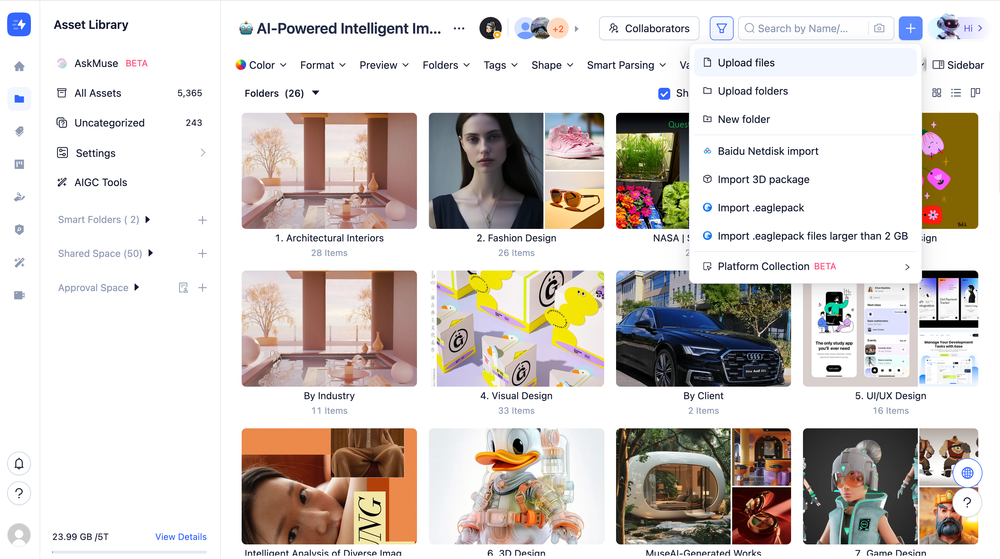
The Bulk Large File Upload feature empowers you to simultaneously upload multiple massive files, supporting up to 20GB per single file

.jpg&w=3840&q=75)
The Bulk Large File Upload feature empowers you to simultaneously upload multiple massive files, supporting up to 20GB per single file
(Note: For exceptionally large batches or files, we highly recommend using the MuseDAM Desktop App for the best performance).
MuseDAM supports in-browser previews for a vast array of file types:
A: Try the following optimizations:
A: MuseDAM provides several safety nets:
A: Yes! You can minimize the window or navigate to other tabs. The upload process will continue in the background, and you can return to the upload panel anytime to check the progress.
Fix: Verify the single file does not exceed the 20GB limit. Consider zipping the file or contacting your system administrator to request a higher limit.
Fix: Ensure "Resumable Uploads" is enabled. Check your corporate firewall settings, or switch to a dedicated enterprise network line.
Fix: Check your workspace's storage quota. Clean up obsolete history/files, or contact your administrator to upgrade your storage capacity.